
How to Log in to the Client Portal
Updated 7 months Ago
Logging in to your account is a critical step for managing funds, initiating trades, accessing information, and maintaining account security.
Procedure
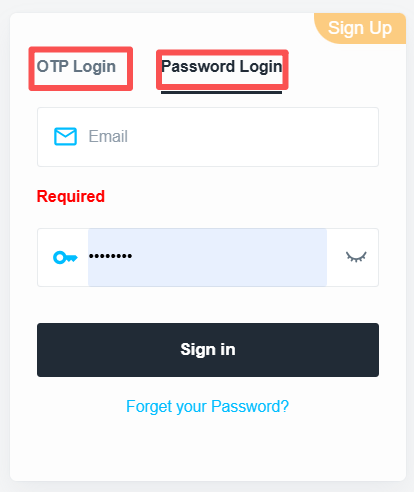
- Go to the FP Markets Client Portal login page.
- You may choose to log in using either your verified mobile number or your registered email address.
Note:
- For your first login, you must use your email address and password. Subsequent logins may use a mobile verification code.
- If your mobile number has not been successfully linked, mobile verification login will not be available.
Option 1: Log in with Mobile Number
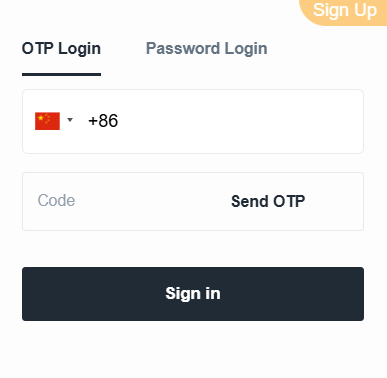
- Click “Mobile Verification Login” on the login page
- Enter your verified mobile number
- Click “Send Code” to receive an SMS verification code
- Enter the verification code in the required field
- Click “Login” to access your account
Option 2: Log in with Email

- Click “Password Login” on the login page
- Enter your registered email address and account password
- Click “Sign In” to access your account
Related Articles
- Account Registration
- How to Upload Identification Documents
- How to Upload Proof of Address
- Document Requirements
- How to Bind a Mobile Number
- How to Add a Demo Trading Account
- How to Open a Corporate Account
- Account Automatic Archiving Policy
- How to Adjust Trading Leverage
- How to Reactivate an Archived Account
- How to Close Your Account
- How to Add an Additional Account
- Negative Balance Reset