
How to Update Your Trading Password
Updated 7 months Ago
Regularly updating your trading password is essential for account security. By doing so, you can reduce the risk of account information being compromised and enhance overall account protection.
Procedure
Step 1: Access the Settings Window
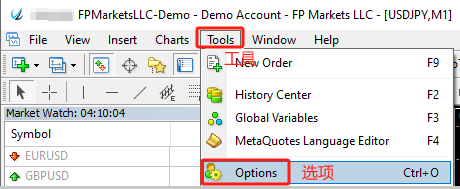
- Open MetaTrader 4 (MT4) or MetaTrader 5 (MT5)
- Click “Tools” in the top menu
- Select “Options”
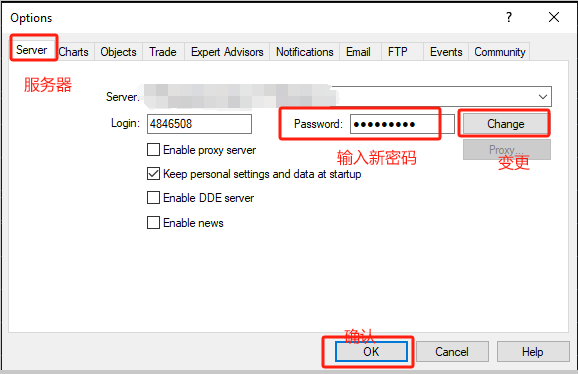
- In the pop-up window, go to the “Server” tab
- Click the “Change” button
Step 2: Change the Trading Password
- In the “Change Password” window, select “Change Master Password”
- Enter your current password
- Enter a new trading password and click “OK” to confirm
Password Requirements:
- Must be a strong password
- Minimum 8 characters
- Must include all four character types: lowercase letters, uppercase letters, numbers, and special symbols
Important Notes
- Ensure your new password meets the platform’s complexity requirements
- Record and store your password securely to prevent loss or unauthorized access
- You can also update your trading password via the Client Portal. For details, refer to the “Update Trading Password” guide
Related Articles
- How to Change MT4/MT5 Platform Language
- How to Download MT4 Desktop Version
- How to Download MT5 Desktop Version
- How to Log in to MT4/MT5 Desktop Platform
- How to Log in to MT4/MT5 Web Platform
- How to Place a New Order
- How to Modify Orders
- How to Set an Investor (Read-Only) Password
- How to Add / Hide Trading Instruments
- How to Check Maximum Trading Volume
- How to Check Trading Hours
- How to View Trading History
- How to Save Trading History
- How to Close a Position
- How to Partially Close a Position
- Mac MT4/5 “App Damaged” Issue Guide