
How to Log in to MT4/MT5 Desktop Platform
Updated 5 months Ago
Logging into the MetaTrader 4 (MT4) or MetaTrader 5 (MT5) platform is essential for trading. The platform provides real-time market data, technical analysis tools, order execution, and account management features, making it the core tool for trading activities.
Procedure
Step 1: Access the Login Window
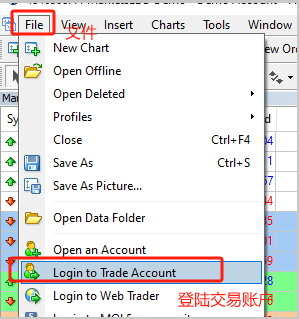
- Open the MT4/MT5 desktop platform
- Click “File” in the top menu
- Select “Login to Trade Account”
Step 2: Enter Login Details
- After creating a live or demo account, check your email with the subject:
“Your MT4/MT5 Live/Demo Account is Ready” - In the login window, enter the following details:
- Login: Your trading account number
- Password: Your trading password
- Server: Select the appropriate server
- Server selection:
- Live Accounts:
- MT4: FPMarketsLtd-Live5
- MT5: FPMarketsLtd-Live2
- Demo Accounts:
- FPMarketsLtd-Demo2 (MT4/MT5)
- Live Accounts:
- For security reasons, passwords in the email may appear as masked characters (****)**
- After verifying the information, click “Login”
Tips
Always select the correct server to avoid login errors
Related Articles
- How to Change MT4/MT5 Platform Language
- How to Download MT4 Desktop Version
- How to Download MT5 Desktop Version
- How to Log in to MT4/MT5 Web Platform
- How to Place a New Order
- How to Modify Orders
- How to Update Your Trading Password
- How to Set an Investor (Read-Only) Password
- How to Add / Hide Trading Instruments
- How to Check Maximum Trading Volume
- How to Check Trading Hours
- How to View Trading History
- How to Save Trading History
- How to Close a Position
- How to Partially Close a Position
- Mac MT4/5 “App Damaged” Issue Guide