
How to Check Maximum Trading Volume
Updated 1 week Ago
Viewing the maximum trading volume of an instrument in MetaTrader 4 (MT4) or MetaTrader 5 (MT5) helps traders plan position sizes effectively, optimize strategies, ensure smooth order execution, and manage risk efficiently.
Steps
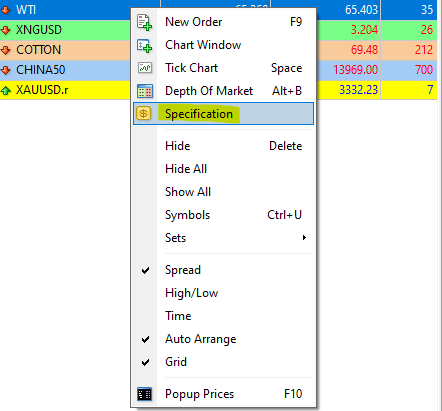
- Open the MT4/MT5 platform and log in to your account
- Open the Market Watch window
- Hover your mouse over the instrument you want to check, then right-click
- From the context menu, select “Specifications”
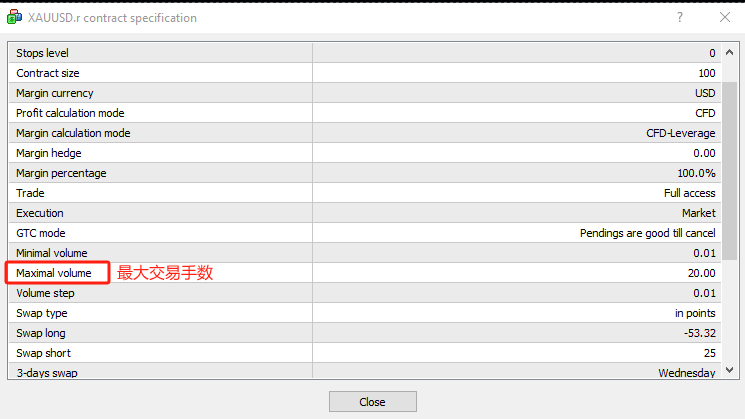
- In the Specification window, locate “Max Volume” to view the maximum tradable lot size
Tips
- Maximum trading volume varies by instrument and leverage. Always check before placing an order.
- Setting position size within allowed limits helps control risk and avoid margin issues or order rejections.
- Consider other trading parameters (e.g., minimum lot size, margin requirements) when planning your strategy.
Related Articles
- How to Change MT4/MT5 Platform Language
- How to Download MT4 Desktop Version
- How to Download MT5 Desktop Version
- How to Log in to MT4/MT5 Desktop Platform
- How to Log in to MT4/MT5 Web Platform
- How to Place a New Order
- How to Modify Orders
- How to Update Your Trading Password
- How to Set an Investor (Read-Only) Password
- How to Add / Hide Trading Instruments
- How to Check Trading Hours
- How to View Trading History
- How to Save Trading History
- How to Close a Position
- How to Partially Close a Position
- Mac MT4/5 “App Damaged” Issue Guide